

Table of Contents
Ever opened a Moodle course and felt like you’d just stumbled into a wall of text? You’re not alone. Too often, Moodle looks more like a digital encyclopedia than a path to real learning. Staring at long lists of files, dense paragraphs, and endless scrolling can make anyone’s eyes glaze over. Instead of finding clear steps or discovering new skills, you might end up hunting for the thread that ties it all together.
Why does this matter? Think about it: when learning feels like wading through a textbook, motivation drops like a stone. Learners start daydreaming or clicking away, their excitement fading with every dull block of text. In contrast, a course that’s active and hands-on hooks people right away. They know where they are, what’s next, and more importantly, what this all means for their job, studies, or career.
Instructors miss out, too. If students keep dropping off or don’t connect the dots, all that hard work building the course feels wasted. Engagement plummets. Progress stalls. Without clear goals, practical activities, and easy navigation, nobody gets what they want: real skills, confidence, and tangible results.
Moodle shouldn’t be a digital attic full of forgotten PDFs. If you want a course that’s lively and useful, it needs to look and feel that way. With better structure, clearer direction, and just a few tweaks, you can turn your course from a slog into an experience something learners are excited to return to, not something they just have to survive.
Common Problems with Traditional Moodle Courses

1️⃣ Too Many Files and Text (The File Dump)
Teachers often upload lots of slides, PDFs, and links without clear organization. This turns the course into a cluttered collection of files that leaves learners wondering where to start or what to focus on.
2️⃣ Difficult and Confusing Navigation
Moodle menus and submenus can feel overwhelming. Learners may have to click through many screens and scroll endlessly, making it hard to find the right lesson or resource. This confusion kills motivation quickly.
3️⃣ Lack of Clear Goals or Connection to Real Work Skills
Many courses don’t clearly explain what skills learners will gain or how lessons relate to their job or daily life. Without this purpose, learners struggle to see why they should keep going and lose interest.
What Modern Learning Platforms Do Right

✅ They build simple, clear learning paths
You can jump into a Udemy or Coursera course and instantly know where you are and where you’re going. Each step leads smoothly to the next, so you don’t have to guess what comes after finishing a lesson. Think of it like following a trail of breadcrumbs each piece takes you closer to your goal without detours or dead ends.
✅ They keep lessons short and focused
No one likes being overwhelmed with giant blocks of information. Modern platforms cut content into bite-sized, manageable chunks that stick. You’ll find a five-minute video explaining one skill or a quick quiz that checks your understanding right away. This way, you learn fast, remember more, and never feel bogged down.
✅ They show visible progress and motivate you
Progress bars, badges, and completion streaks tell you exactly how far you’ve come and how close you are to the finish line. Every small win gets celebrated, and seeing your own improvement often sparks you to keep going. Motivation isn’t guesswork, it’s built right into the design.
✅ They link learning to real-world jobs and skills
Great platforms don’t just teach for the sake of it. They show you how each lesson connects to practical skills you can use in real life. For example, a course might say, “After this module, you’ll be able to design a website for your business.” When learners see a clear path from each lesson to a real job or career move, they stay interested and push themselves further.
Modern learning platforms make the journey clear, keep lessons quick and lively, show your progress with every click, and tie every step to real skills you can brag about later. That’s why people stick with them and why their learners grow faster and go further.
How to Improve Your Moodle Course

👉 Use Short, Focused Videos
Keep every video lesson under ten minutes so learners never feel overwhelmed. People can easily lose attention if a video drags on. Short videos help you explain one topic at a time, making it easier for learners to watch, understand, and remember. For example, instead of a half-hour lecture, try three short videos, each covering a single main point. Quick wins mean higher motivation.
👉 Break Courses into Skill-Based Modules
Chunk your content so each module builds only one real skill. Tell learners why each part matters. When you create clear modules, people know what they’re learning and why it helps them in real life. A math course could break “Algebra” into smaller lessons like “Solving Equations” or “Graphing Lines.” Clarity beats confusion every time.
👉 Show Learner Progress
Add checkboxes, progress bars, and digital badges so every achievement gets noticed. If a learner finishes a lesson, let them check it off and see their progress right away. When students see how far they’ve come, they push themselves to finish what they started. Little rewards along the way keep everyone on track.
👉 Use Simple, Easy-to-Navigate Layouts
Choose layouts that don’t force people to hunt for what’s next. A clean design and clear menus mean less guessing and more learning. Simple tabs, visible links, or playlists can help guide anyone through the course like signposts on a road. Nobody likes getting lost; make the journey obvious.
👉 Connect Each Lesson to Real Tasks
Always show how lessons tie back to the real world. Give learners small projects, hands-on practice, or group activities. Maybe one lesson ends with a mini assignment, while another asks learners to discuss ideas in a forum. When people can use what they learn right away, it sticks for the long haul.
Mixing up your teaching methods with these simple steps turns Moodle from a pile of files into a real learning adventure. Give learners a reason to stay, practice, and come back for more.
Introducing Edwiser Video Course Format
Looking for a way to turn your Moodle course into something learners can actually enjoy? The Edwiser Video Course Format steps in right where you need it. Instead of wading through a swamp of files, students meet a neat, video-friendly layout that feels more like using YouTube or Coursera.
✨ What is Edwiser Video Course Format?
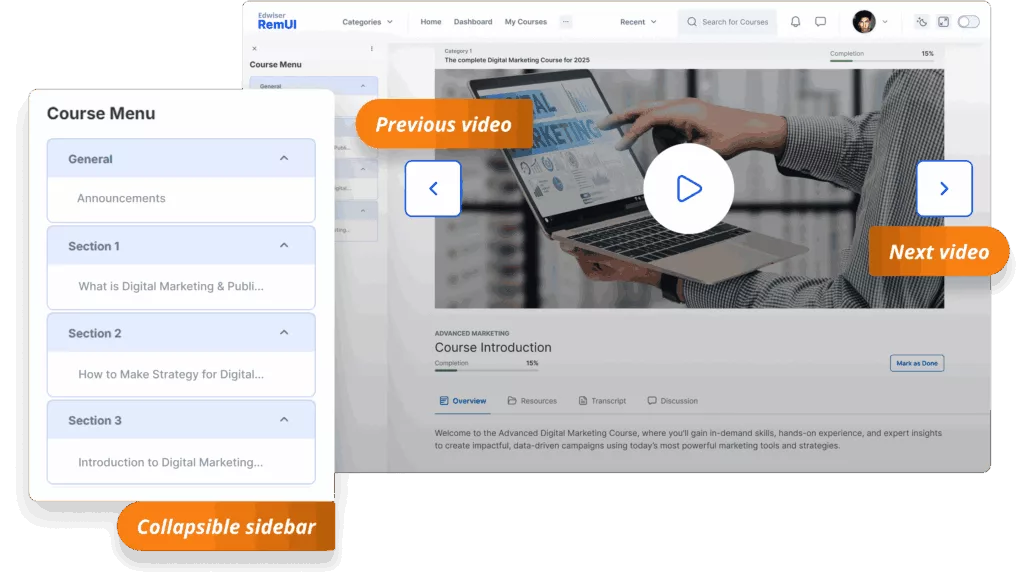
This is a simple plugin for Moodle that gives you a clean, organized way to share video lessons. Imagine a playlist of short, focused videos stacked along the side, each with a clear label like “Next Up.” When you start a lesson, the video pops front and center above anything else, making it easy to keep your attention on learning without distractions.
✨ How does it create a learner-friendly experience?
You won’t see messy menus, wild scrolling, or guessing what’s next. The sidebar shows every lesson at a glance. You can jump ahead, revisit something, or move on without clicking through endless pages. Whether you’re watching on a computer, a phone, or a tablet, the layout stays clean and easy to use. The course keeps you focused on one task at a time, so no one feels overwhelmed.
✨ Why is it easy for both teachers and students?
Teachers can upload a video or add a YouTube or Vimeo link with just a few clicks. You don’t need to be a tech wizard, setting up feels like building a playlist. If you want to test understanding, just drag a quiz into the flow. The format handles the rest, letting you concentrate on teaching, not troubleshooting. Meanwhile, students never need to hunt for the next lesson. They see their progress right from the start and always know where they stand.
✨ How do you set it up in Moodle?
If you’ve ever changed your course format before, you already have the skills you need. Simply go to your course settings, choose ‘Edwiser Video Course Format,’ and save. Then add your videos as you would add a resource or activity. The format arranges them into an easy playlist automatically. You won’t have to fuss with extra plugins, code, or complicated steps.
With Edwiser Video Course Format, anyone can turn a bland Moodle page into a lively, step-by-step video learning journey. Both you and your students will wonder how you ever managed without it.
Enhancing Moodle Courses: Before and After Scenario
| Before | After | |
| Course Layout | Cluttered collection of files, text-heavy | Clean, video-focused, organized playlists and tabs |
| Learner Navigation | Difficult, confusing, endless clicking and scrolling | Simple sidebars, clear menus, sequenced modules |
| Lesson Structure | Long paragraphs, unfocused blocks of info | Short videos (<10min), skill-based chunks, quizzes, hands-on projects |
| Progress Visibility | None | Progress bars, badges, completion streaks |
| Real-World Relevance | Unclear connection to practical skills | Clear goals, direct ties to jobs/tasks, applied assignments |
| Engagement & Motivation | Low motivation, high dropout | High engagement, visible achievements, fun interactive elements |
| Teacher Experience | Frustration, disengaged students | Easy uploads, tracked progress, positive feedback |
Don’t wait for perfection before you start. Sometimes, the smallest change kicks off the biggest transformation. Chunk your lessons, try video-first formats like Edwiser, and always keep the learner in mind. When you make your course easier, clearer, and more useful, you help people grow further and faster than you ever thought possible. So go ahead and start building the kind of Moodle course everyone wants to come back to. The future of learning is simple, vivid, and made for you and your students.