Edwiser New Year Sale: Grab up to 25% OFF on all Edwiser Products

Days
Hours
Minutes
Seconds
Moodle reports slowing down with 1000+ users? We fixed it.

Get actionable insights on learner & course performance on Moodle™ now 10x faster in the Cloud

Easily monitor learner progress & the effectiveness of your courses to drive student engagement with Edwiser Reports

100%
Refundable
99
Spots available
8245
Happy Customers
Header image
GDPR Compliant
Secure Payment
30-Day Refund
Launching Feb 2025

Who does this plugin help?

Teachers

Learner progress & performance reports. Identify at-risk learners, improve learning outcomes.

Department heads

High-level macro overview of LMS performance. Assess teacher performance, monitor site.

Admins & Managers

Get personalized & shareable dashboards. Build your own reporting dashboards.

31+
Customers Surveyed
92%
Report Performance Issues
70%
Want Cloud Solution
8200+
Happy Customers
It's Great, 10/10 - Can't Work Without It You can obtain in a simple way, with just a few clicks, time reports dedicated to a course, access to the platform, activities/courses completed, and much more. I currently cannot conceive working in Moodle without Reports PRO, a wonderful extension without any doubt.
OIP
Isidro Herrero Fernandez
Patho Informatica
Create a complete digital storefront and manage discounts

Sell individual courses, bundles, or supporting course material as physical products. Manage discounts, coupons, and set up a complete digital storefront for your courses seamlessly.

Edwiser list format lg
Feature 1 1 1
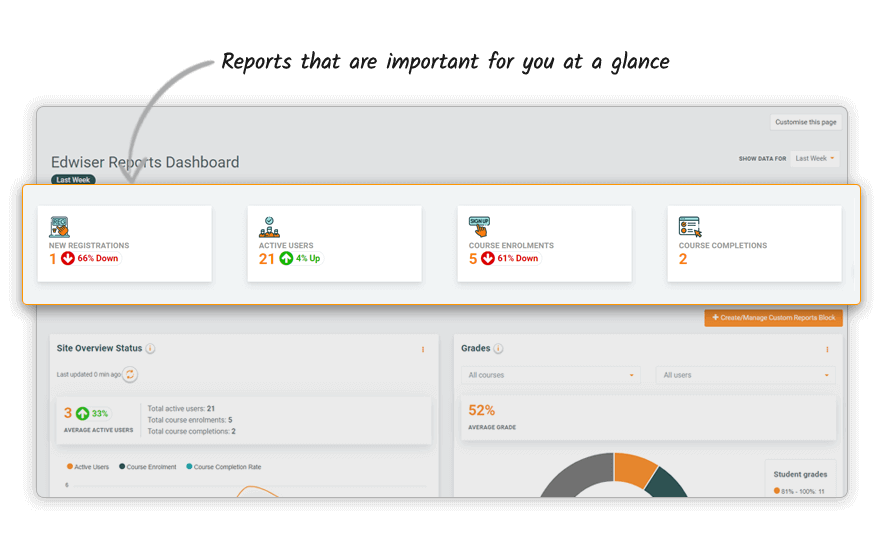
Dashboard

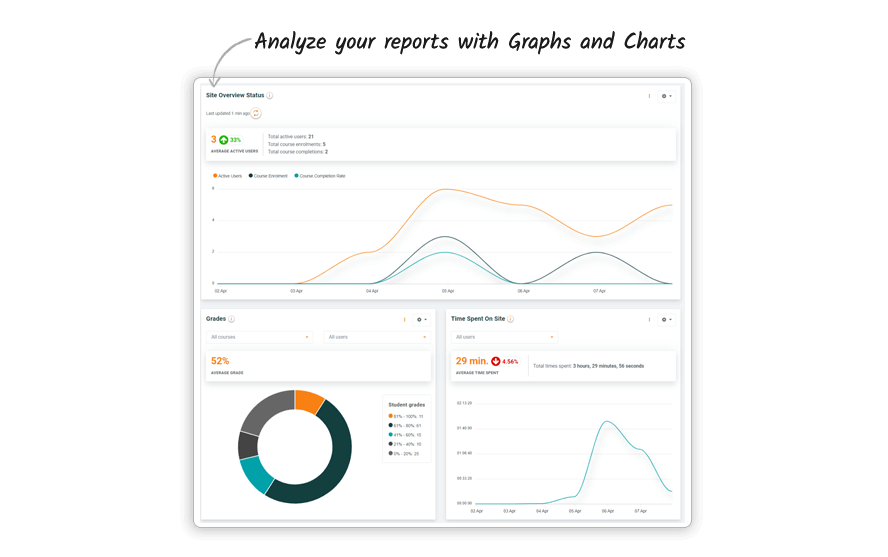
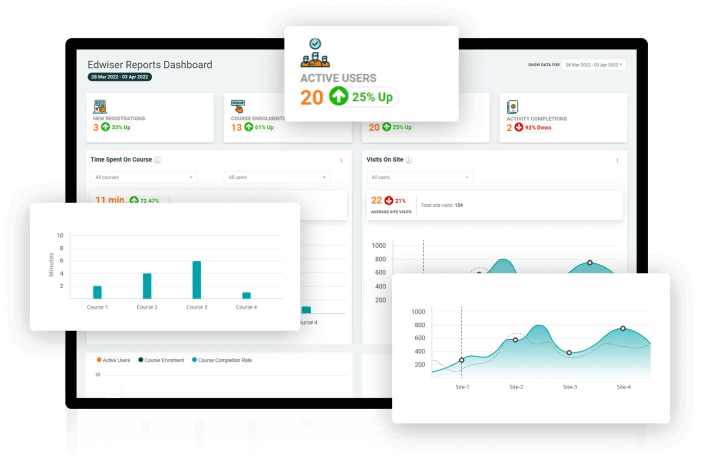
Visualizing key insights & monitoring trends made easy with Edwiser Reports Plugin for Moodle Software Platform

Who can use them – Admins, Managers, Teachers

Admin Overview

Maintaining & managing Reports made easy

Who can use them - Admins, Managers

Reports for Teachers

Get comprehensive understanding of learner engagement, course progress, & more with Reports for Moodle software platform

Who can use them - Teachers, Instructors, Trainers

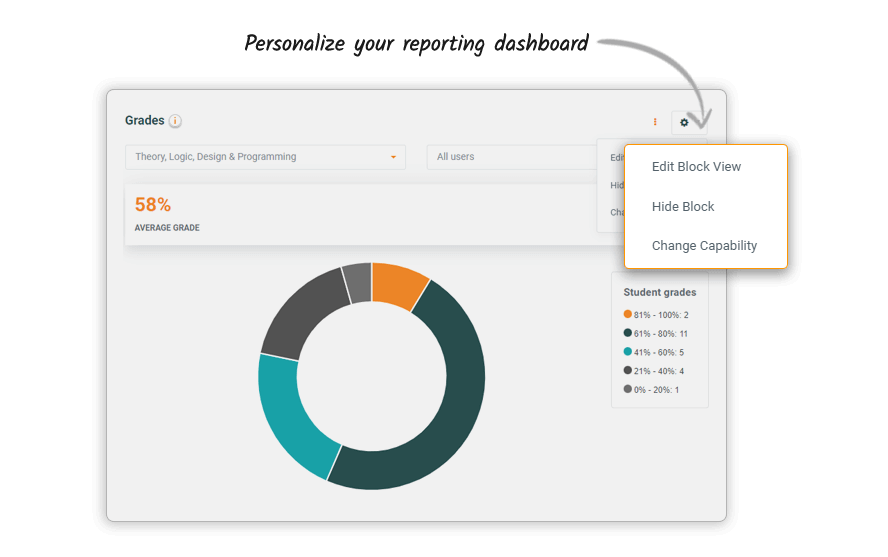
Customization of Moodle Reports

Customize reports in minutes to fit your needs with Edwiser Report Builder

Reporting dashboard for Admins, Instructors, Teachers

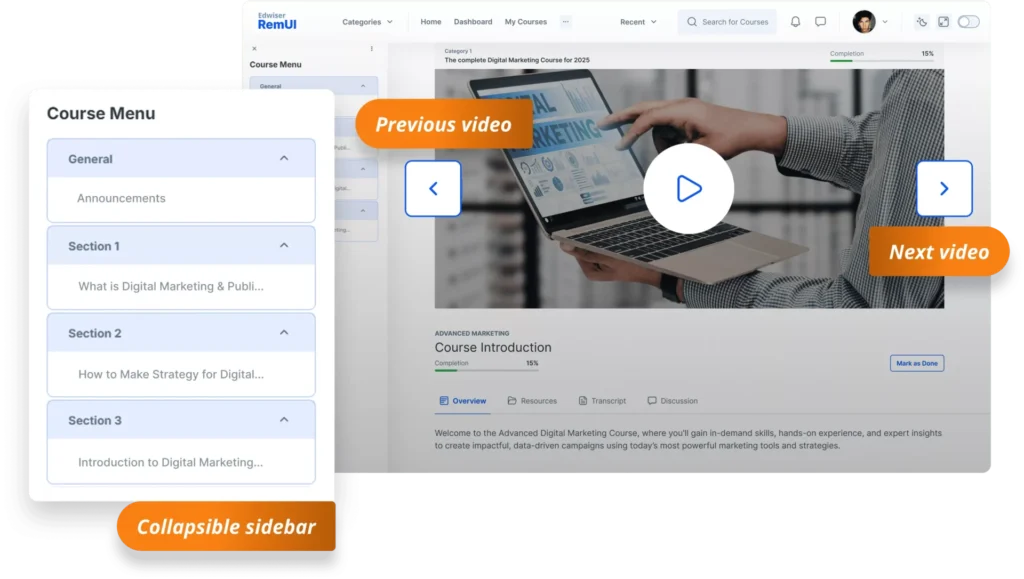
Learner Dashboard

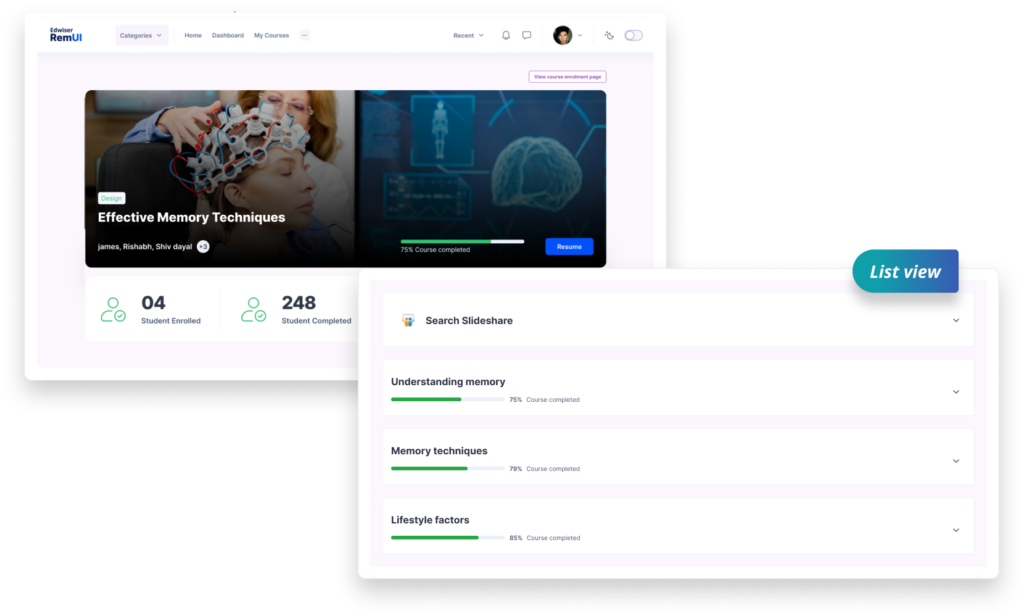
Help learners improve their performance with insightful Reports in Moodle software platform

Who can use it - Students

Updates & Notification

Get key insights proactively at the right time with Edwiser Reports for Moodle software platform

Who can use it – All users

Why Switch to Cloud?

See how Cloud solves the performance problems you've been facing

Traditional Approach

️Self-Hosted Reality

All Advantages

Cloud Solution

Flexible pricing to suit different reporting needs

Edwiser Reports Free

Perfect for getting started

$0 /Forever free

Designed for 1,000 users

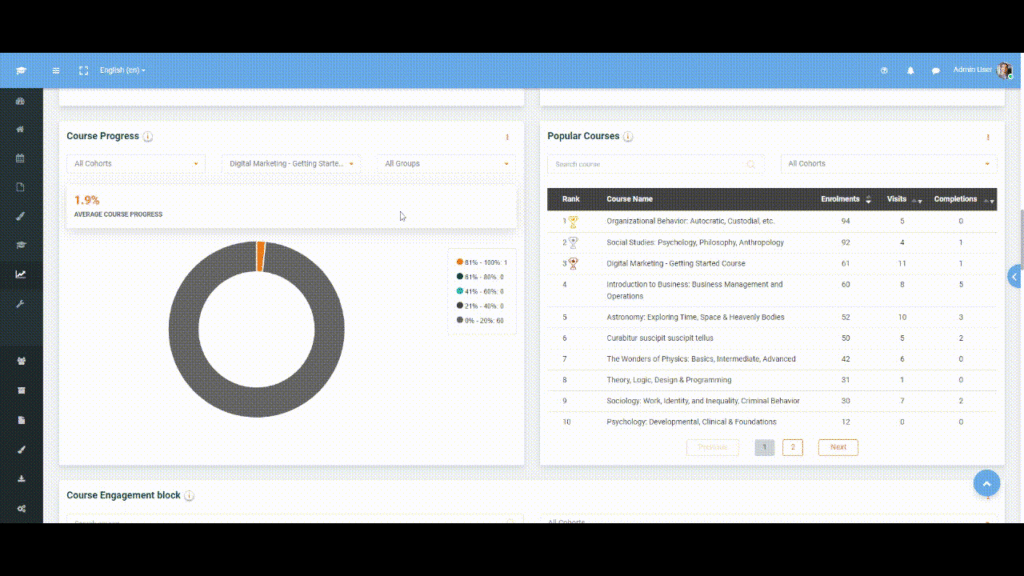
Course progress report
 
Course progress report

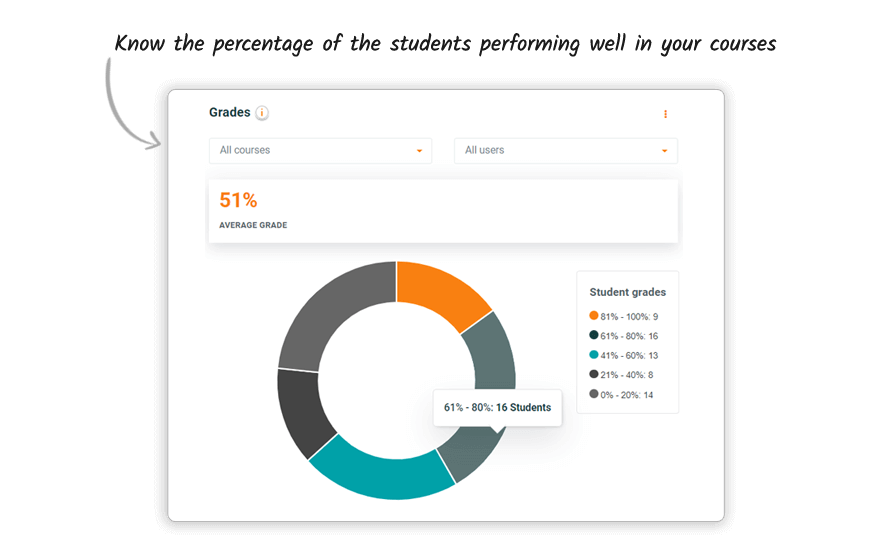
It helps teachers and Managers understand student’s progress in the
course. This blocks allows you to understand how many users have completed
the courses, how many has completed 0-20%, 20-40% and so on…

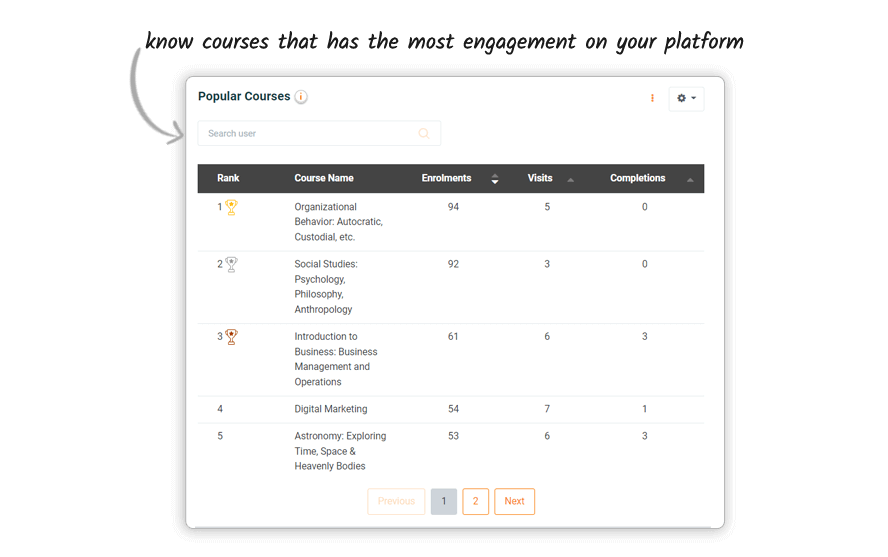
Popular Course report
 
Popular Course report

It helps you understand which course has the most number of enrollment,
visits and course completion

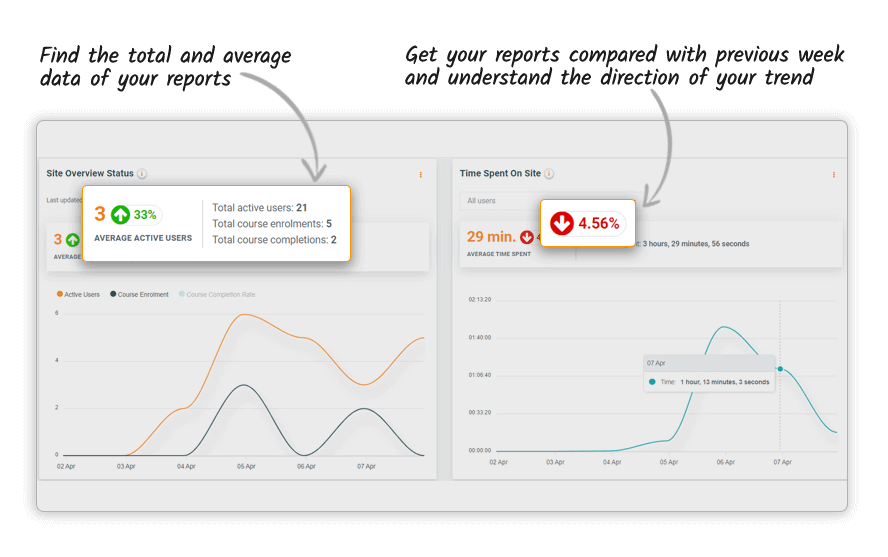
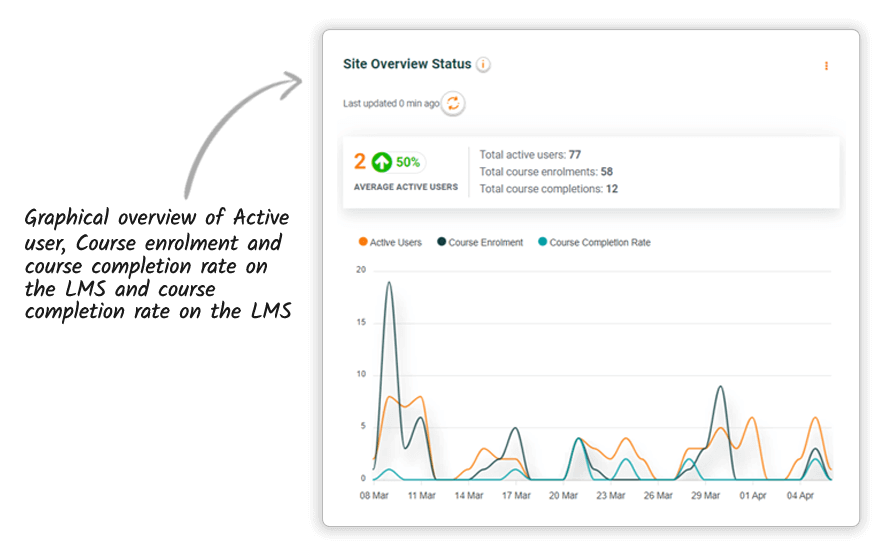
Active Users, Course Enrolment and Course Completion Rate
 
Active Users, Course Enrolment and Course Completion Rate

Comparison of Active Users, Course Enrolment and Course Completion Rate in
graphical format

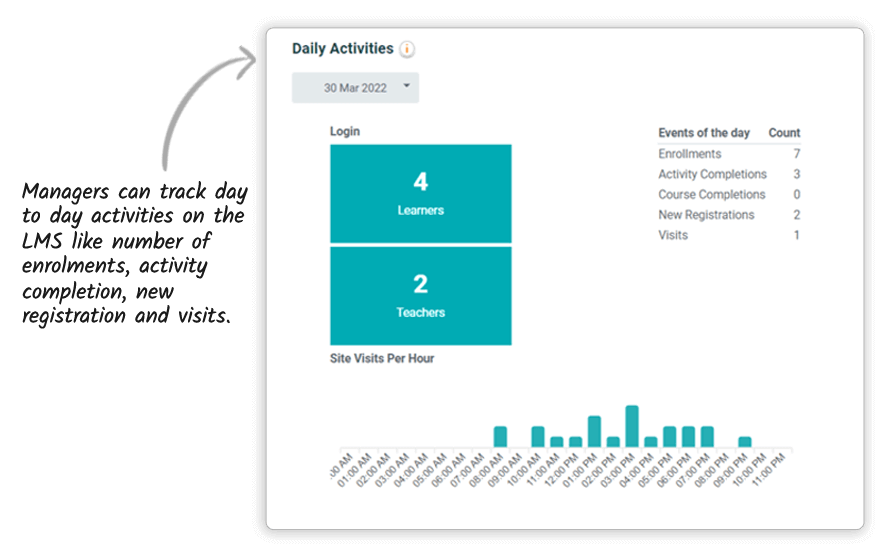
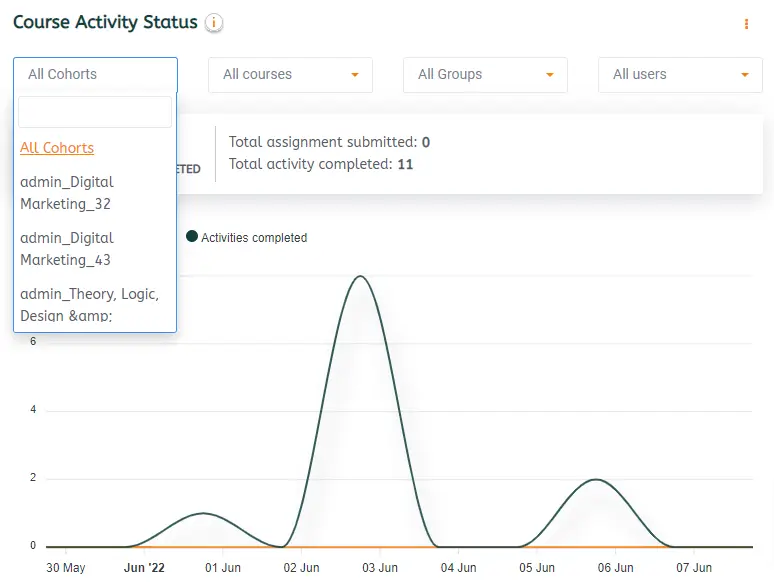
Daily Activities
 
Daily Activities

Managers can track day to day activities on the LMS like number of
enrollments, activity completion, course completion, new registration and
visits

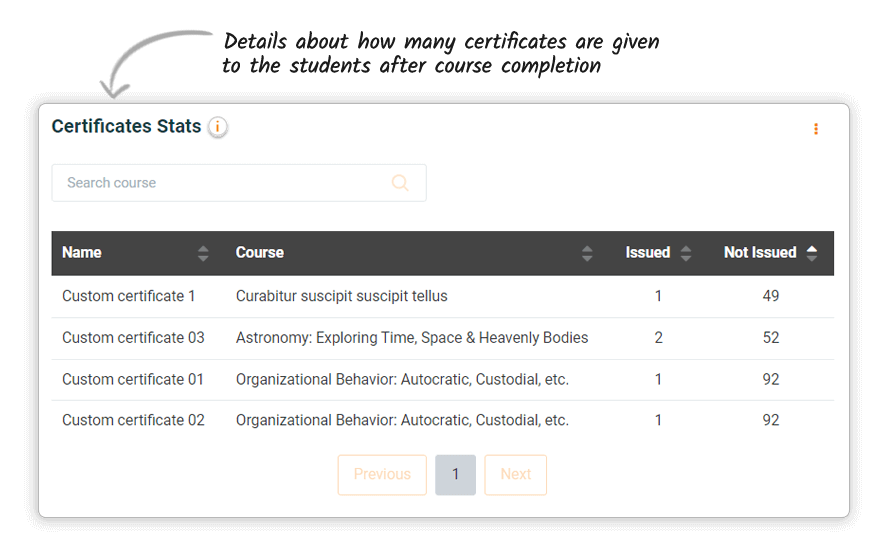
Certificates Stats
 
Certificates Stats

Details about how many certificates are given to the students after course
completion

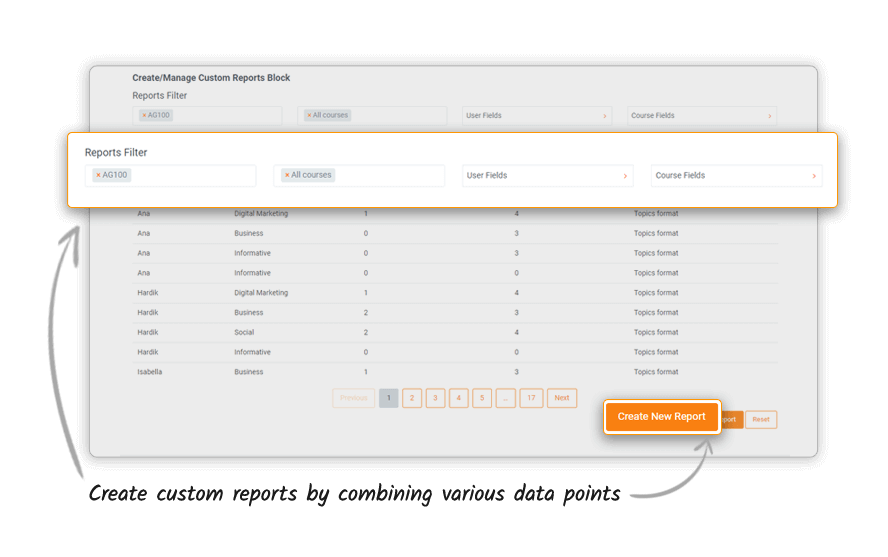
Custom reports
 
Custom reports

Create Custom reports by combining various data points

Edwiser Reports Cloud

An all-in-one design, e-commerce and analytics package by Edwiser

99

Spots remaining out of 100

$20 /one-time

Pre-booking deposit • Fully refundable

What you get for $20:

Designed for 1,000 - 50,000+ users

Course engagement report
 
Course engagement report
It helps you understand how many users are enrolled in the course, how
many visits are there for a particular course
Ability to export reports in PDF, excel, pdf
 
Ability to export reports in PDF, excel, pdf
Ability to export reports in multiple formats to share with your
managers
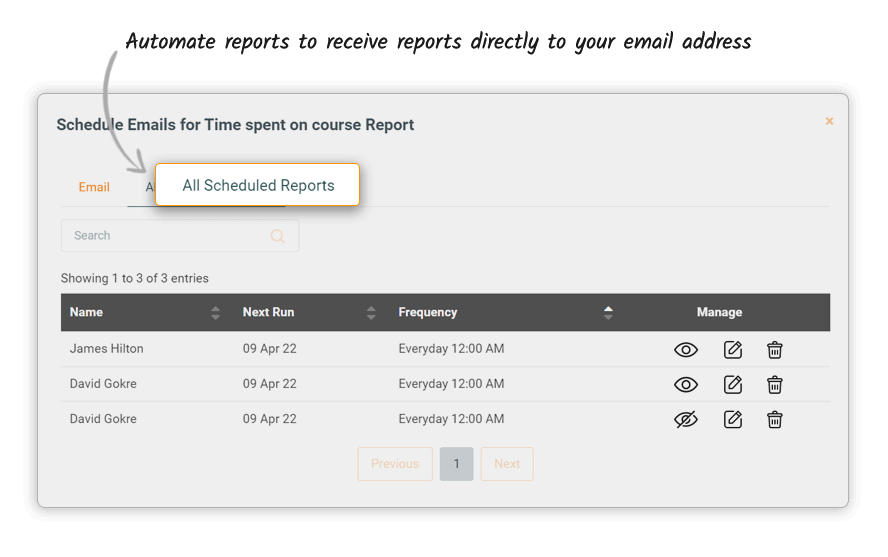
Ability to schedule an email of the report
 
Ability to schedule an email of the report
Automated reports to receive reports directly to your email address. You
need not login to the Moodle site always to check the report. Automated
notification.
Student engagement report
 
Student engagement report
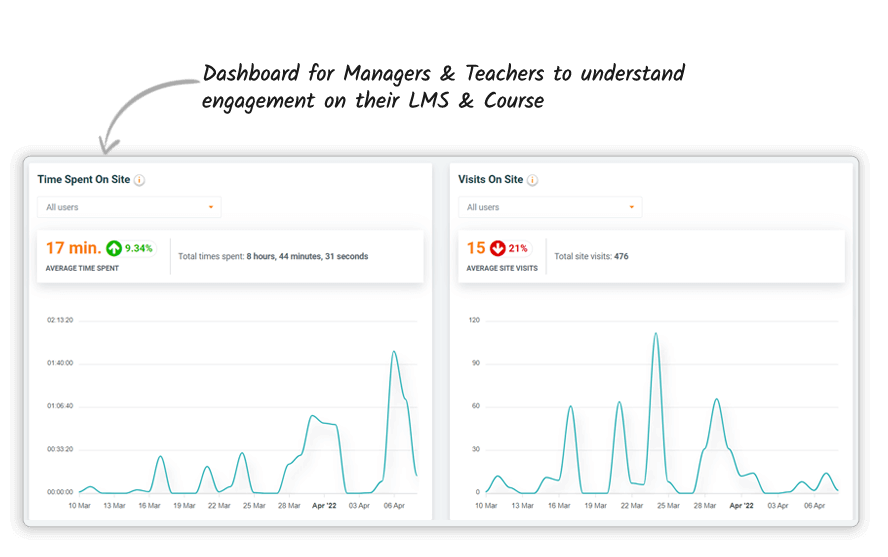
Reporting block for Managers teachers to understand engagement on their
LMS, course, and activities
Learner report
 
Learner report
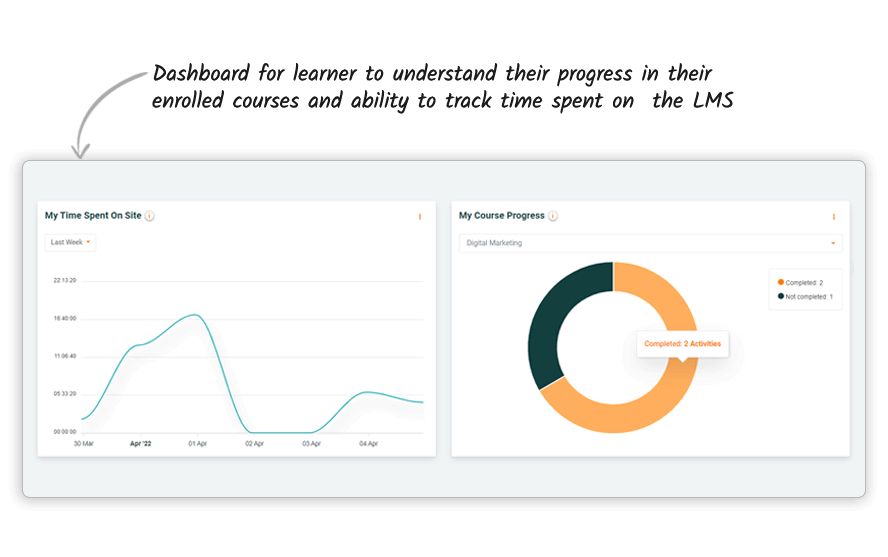
Reporting block for learner to understand their progress in their
enrolled courses and ability to track time spent on the course
Time tracking on LMS
 
Time tracking on LMS
Understand how much time is spent on LMS to calculate ROI. Important for
Manager and Head of department to track this metric
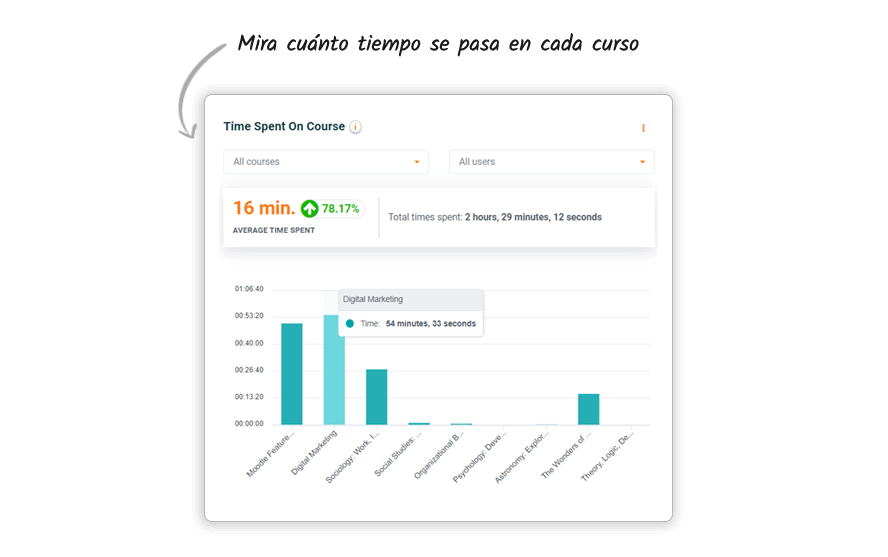
Time tracking on Course
 
Time tracking on Course
Understand how much time is spent on every course to understand which
courses are working well among your students. Important for Managers and
teachers
Time tracking on activities
 
Time tracking on activities
Understand how much time is spent on every activity inside a course so
as to understand which activities are time taking, where are students
facing issues with course completion
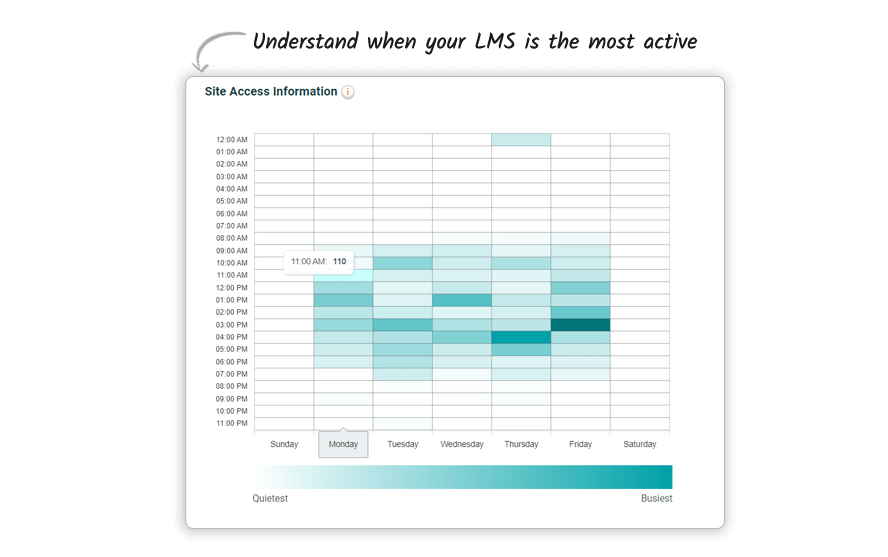
Number of visits on LMS
 
Number of visits on LMS
To understand total visits on LMS helping you understand where there are
the most amount of visits in a day or week
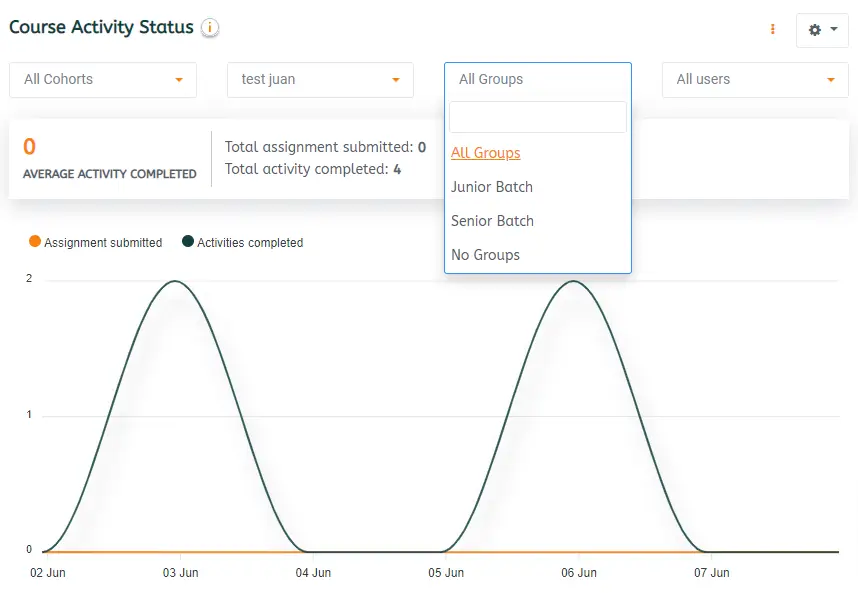
Cohorts and Group Filters
 
Cohorts and Group Filters
Drill down to individual course groups & analyze the batch-wise
performance
Chat Live

🛡️100% refundable anytime, no questions asked.
Don't want to wait? Just email edwiser@wisdmlabs.com

remui moodle theme money back guarantee badge

100% Risk-Free Money-Back Guarantee!

Our #1 priority is your satisfaction! Get a full refund for new purchases or renewals within 30 days of purchase.

Your Path to Lightning-Fast Reports

Here's what happens after you pre-book

1

Pre-Book Now

Now - Jan 2026

2

Take Survey

-

3

Open Beta

Feb 2026

4

Launch (March)

1 Month Free To use

Ratings & Reviews

Explore Ratings & Reviews for valuable insights

4.75 Avg. Rating & 236 Reviews

SDSU
Norwich university
INQBA
Clarkson

Get Help

Installation & User Guide

Everything that you need to know to set up Edwiser Reports right. Explore

Product Support

All Plugins and Themes sold by Edwiser are 100% GPL. Explore

List of changes

Record of all the notable changes made to Edwiser Reports Explore

Frequently Asked Questions

What version of Moodle does Edwiser Reports support? Are there any prerequisites?
Edwiser Reports will work fine with Moodle versions 4.1 to 4.5 (latest release). Also, you need to setup Cron Job and Course completion criteria for the plugin to gather information from your LMS site.
You have the option to export reports in CSV, Excel, and PDF format. You can also schedule or instantly send the reports to your email.
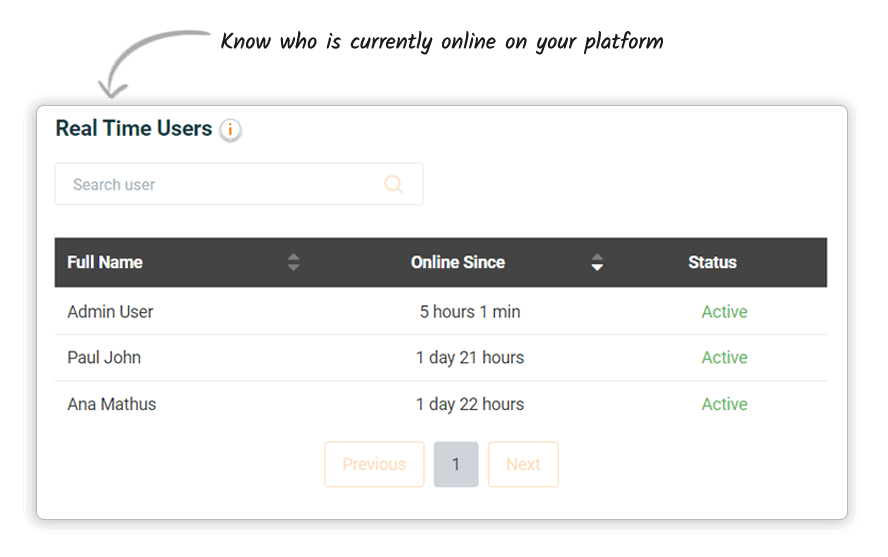
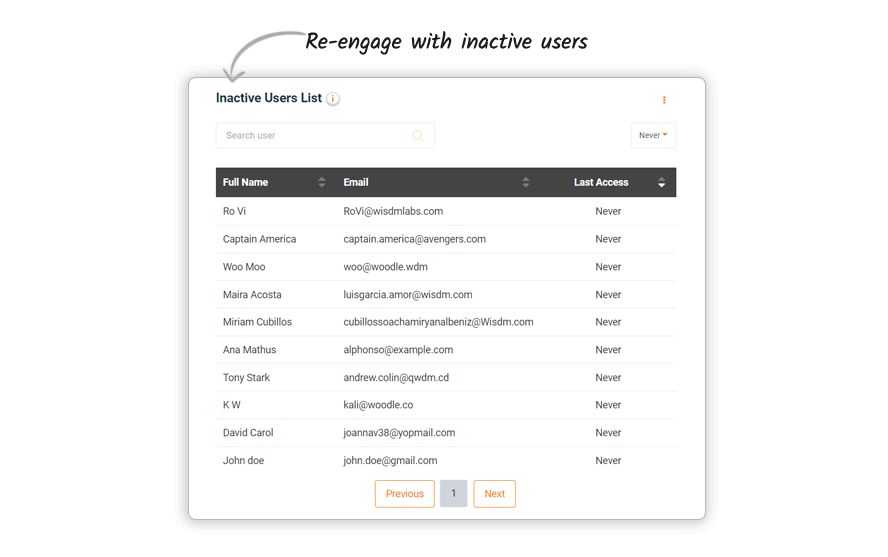
Site Overview Status, Course Progress block, Popular Courses block, Daily Activities block, Real-time users block, Inactive users Block, and Certificate stats block. It also includes Custom Report Builder.
Yes, Edwiser Moodle Reports is translation ready and is translated to Spanish, German, French and Polish out of the box.
Please refer to these terms & conditions to know more about our refund policy.

Ratings and Reviews